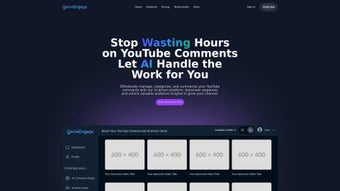

Download Genie Engage – AI Business Assistant, Customer Engagement, Automation Tool
Overview
Genie Engage is a web‑based, subscription‑driven AI assistant built specifically for businesses that want to boost customer interaction quality while cutting down on repetitive operational tasks. Powered by cutting‑edge machine‑learning models, Genie Engage learns from each conversation, continuously refining its responses to become more accurate, personable, and aligned with a brand’s voice. The platform goes beyond simple chat automation; it integrates workflow orchestration, predictive analytics, and real‑time sentiment analysis to give teams a single hub where they can automate routine queries, route complex tickets to the right agents, and generate actionable insights without leaving the browser.
By handling the “busy work” through intelligent automation, Genie Engage frees up staff to focus on strategic initiatives such as product development, market expansion, and relationship building. Its adaptive learning engine ensures that the AI improves over time, delivering a personalized experience that feels genuinely human, while the robust reporting suite lets managers track engagement metrics, response times, and conversion rates. Whether you’re a small startup looking for a cost‑effective way to scale support or a large enterprise seeking to unify disparate customer‑facing tools, Genie Engage offers a secure, scalable, and highly configurable solution that fits into any digital strategy.
In addition, the service provides built‑in compliance tools, multilingual support, and a dedicated success team that assists with onboarding, ensuring that even organizations with limited technical resources can adopt the platform quickly and confidently.
Core Features & Installation Guide
Key Features That Power Business Growth
The feature set of Genie Engage has been engineered to address the most common pain points in modern customer service environments. From intelligent conversation handling to deep integration capabilities, each component works in harmony to create a seamless experience for both agents and end‑users. Below is a detailed breakdown of the core capabilities that make Genie Engage stand out in a crowded market.
- Adaptive AI Conversations: Natural language understanding that evolves with each interaction, delivering context‑aware replies.
- Workflow Automation: Drag‑and‑drop builder to automate ticket routing, follow‑up emails, and data entry across CRM, ERP, and help‑desk systems.
- Real‑Time Sentiment Analysis: Detects customer emotions instantly, allowing agents to prioritize urgent or negative experiences.
- Multi‑Channel Integration: Connects seamlessly with web chat, email, social media, and messaging apps like WhatsApp and Slack.
- Customizable Knowledge Base: Admins can import FAQs, policy documents, and product catalogs that the AI draws from when answering.
- Analytics Dashboard: Visualizes engagement metrics, conversion funnels, and AI performance trends in real time.
- Secure Data Handling: End‑to‑end encryption, GDPR compliance, and role‑based access controls protect sensitive information.
- Scalable Architecture: Cloud‑native infrastructure that auto‑scales during peak traffic without performance loss.
Step‑by‑Step Installation & First‑Time Use
Installing Genie Engage is intentionally frictionless. Because the platform is SaaS‑based, there is no need to download or configure server software locally. The following guided steps walk you through account creation, environment configuration, and the launch of your first automated workflow. Each step includes tips for best practices, helping you avoid common pitfalls and get the most out of the system from day one.
- Create Your Account: Visit the Genie Engage website, click “Start Free Trial,” and fill out the registration form with your business email and password. An activation link is sent to confirm your address.
- Select a Subscription Plan: Choose from “Starter,” “Professional,” or “Enterprise” tiers. Each plan unlocks a different set of AI conversation limits, workflow automations, and support levels.
- Configure Domain & SSL: For web‑chat integration, add your website domain in the “Integrations” tab. Genie Engage provides a one‑click SSL certificate to secure data transmission.
- Connect Existing Tools: Use the pre‑built connectors to link your CRM (Salesforce, HubSpot), help‑desk (Zendesk, Freshdesk), and marketing platforms (Mailchimp, HubSpot). Authentication is handled via OAuth for maximum security.
- Build Your First Workflow: Drag a “New Ticket” trigger onto the canvas, add a “Assign to Team” action, and set a “Send Confirmation Email” step. Test the flow with a dummy query to ensure proper routing.
- Upload Knowledge Base Content: Import CSV or JSON files containing FAQs, product specs, and policy documents. Tag each entry for easy retrieval by the AI engine.
- Train the AI (Optional): Upload historical chat logs or support tickets. Genie Engage’s training module will analyze the data, teaching the model your preferred tone and response style.
- Go Live: Activate the web‑chat widget on your site, enable social media bots, and start monitoring real‑time analytics from the dashboard. Use the “Live Preview” mode to observe how the AI handles live visitors.
Installation is entirely browser‑based—no client‑side software download is required, which makes deployment fast and secure. The platform also offers a mobile‑optimized admin console, allowing managers to adjust settings on the go from any device. For teams that prefer a more hands‑off approach, Genie Engage includes an “auto‑configure” wizard that pre‑populates common workflows based on industry templates, further reducing the time to value.
Compatibility, System Requirements, and Pros & Cons
Supported Operating Systems & Browsers
Genie Engage runs on any modern web browser, making it compatible with Windows 10/11, macOS Catalina and later, Linux distributions, as well as mobile operating systems like Android 8.0+ and iOS 13+. Because the application is SaaS‑based, there’s no need for local installations, and updates are applied automatically on the server side. The platform is optimized for Chrome, Edge, Firefox, and Safari, with progressive‑enhancement techniques ensuring graceful degradation on older browsers. For organizations with strict IT policies, Genie Engage also supports single‑sign‑on (SSO) via SAML 2.0 and integrates with corporate VPNs without exposing additional ports.
Pros
- Highly adaptive AI that improves with usage, reducing repetitive query handling.
- Intuitive drag‑and‑drop workflow builder requires no coding expertise.
- Robust multi‑channel support consolidates chats, emails, and social messages.
- Comprehensive analytics provide actionable insights for continuous improvement.
- Strong security measures (SSL, GDPR, role‑based access) protect customer data.
- Scalable cloud infrastructure handles spikes in traffic without downtime.
- Extensive integration library reduces the need for custom API development.
- Dedicated onboarding specialists help teams launch quickly.
Cons
- Subscription pricing may be high for very small businesses with limited budgets.
- Initial AI training requires a modest amount of historical data to reach optimal performance.
- Advanced customization (e.g., custom language models) is only available on Enterprise plans.
- Reliance on internet connectivity; offline usage is not supported.
- Complex enterprise setups may need additional consulting hours for deep integration.
The pros and cons list reflects real‑world feedback from early adopters. While the price point can be a hurdle for startups, many find the ROI quickly realized through reduced support costs and higher customer satisfaction scores. Organizations that prioritize data privacy also appreciate the built‑in compliance features, which can save months of internal audit work.
Frequently Asked Questions
Below you’ll find answers to the most common queries from businesses evaluating Genie Engage. These FAQs cover licensing, integrations, security, setup complexity, and support options, helping you make an informed decision before committing to a subscription.
Is Genie Engage a free tool or does it require a subscription?
Genie Engage offers a 14‑day free trial with full feature access. After the trial, you must choose a paid subscription plan (Starter, Professional, or Enterprise) to continue using the service.
Can Genie Engage integrate with my existing CRM and help‑desk software?
Yes. Genie Engage includes native connectors for popular CRMs (Salesforce, HubSpot, Zoho) and help‑desk platforms (Zendesk, Freshdesk, ServiceNow). Integration is handled via OAuth, and custom APIs can be added using the platform’s webhook feature.
How secure is the data stored in Genie Engage?
Genie Engage employs end‑to‑end encryption, TLS 1.3 for data in transit, and AES‑256 encryption at rest. The service complies with GDPR, CCPA, and ISO 27001 standards, and offers role‑based access controls for granular permission management.
Do I need any technical expertise to set up Genie Engage?
No coding is required for basic setup. The intuitive UI, drag‑and‑drop workflow builder, and step‑by‑step wizard guide you through configuration. Advanced customizations may require a developer familiar with API integrations.
What kind of support does Genie Engage provide?
Support options vary by plan. The Starter tier includes email support with a 24‑hour response time. Professional and Enterprise tiers receive priority email, live chat, and optional dedicated account managers. All customers have access to a comprehensive knowledge base and community forum.
Conclusion & Call to Action
Genie Engage stands out as a robust, AI‑driven platform that transforms how businesses interact with customers and manage internal workflows. Its adaptive learning engine, combined with a powerful automation suite, delivers measurable efficiency gains while preserving a human touch in every conversation. Though the subscription cost may be a consideration for very small teams, the reduction in support overhead, higher satisfaction scores, and actionable analytics often justify the investment within weeks of deployment.
If you’re ready to modernize your customer engagement strategy, streamline repetitive tasks, and unlock data‑driven insights, download Genie Engage today and start your free trial. Experience a secure, scalable, and truly intelligent assistant that grows with your business. Take advantage of the 14‑day trial, explore the full feature set, and see firsthand how automation can free your agents to focus on high‑value interactions that drive revenue and loyalty.



.png)



